In SQL Server, ISNULL and NULLIF are two essential functions used to handle NULL values, but they serve very different purposes.
ISNULL is used to replace NULL with a specified value, making it ideal for providing default values. NULLIF is used to return NULL when two expressions are equal, which is especially useful in avoiding divide-by-zero errors or simplifying conditional logic. Understanding when and how to use each of these functions can significantly improve your T-SQL code’s readability and robustness.
Syntax of ISNULL and NULLIF
- ISNULL
- ISNULL(expression, replacement_value)
- Returns the replacement_value if expression is NULL, otherwise returns expression.
- NULLIF
- NULLIF(expression1, expression2)
- Returns
NULLifexpression1equalsexpression2, otherwise returnsexpression1.
T-SQL Examples to Illustrate ISNULL and NULLIF
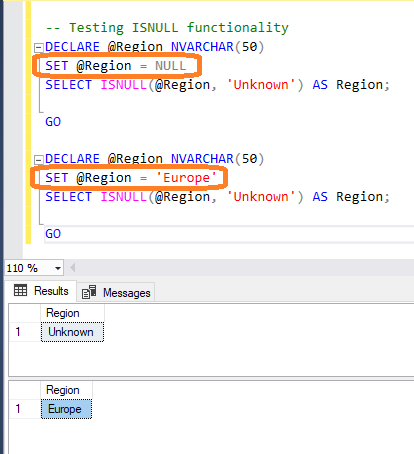
ISNULL: In the example below, when we pass a NULL value to the Region variable, ISNULL returns 'Unknown'. This means that when an expression is NULL, ISNULL returns the specified replacement value — which is 'Unknown' in this case.
When we pass a non-NULL value, e.g., 'Europe', ISNULL returns 'Europe'.
-- Testing ISNULL functionality
DECLARE @Region NVARCHAR(50)
SET @Region = NULL
SELECT ISNULL(@Region, 'Unknown') AS Region;

GO

DECLARE @Region NVARCHAR(50)
SET @Region = 'Europe'
SELECT ISNULL(@Region, 'Unknown') AS Region;

GO
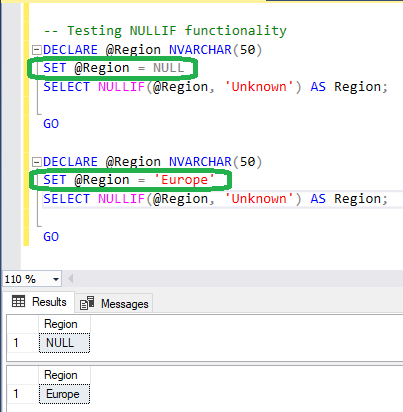
NULLIF: In the example below, when a NULL value is passed to the Region variable, NULLIF returns NULL. When a non-NULL value (e.g., 'Europe') is passed to the Region variable, NULLIF returns 'Europe'
-- Testing NULLIF functionality
DECLARE @Region NVARCHAR(50)
SET @Region = NULL
SELECT NULLIF(@Region, 'Unknown') AS Region;

GO

DECLARE @Region NVARCHAR(50)
SET @Region = 'Europe'
SELECT NULLIF(@Region, 'Unknown') AS Region;

GO